
How to Do Keyword Research on Noon.com
How to find out what shoppers are actually searching for on Noon.com, how competitive a keyword really is, and how to research keywords without guessing.
See it in action →Why keyword research matters
If you don't know what shoppers actually search for on Noon, you might spend money on a product nobody wants.
But knowing what people search for is only half the picture. You also need to know how many other sellers are already competing for that same word, and how strong their listings are. A keyword with plenty of buyers can still be a bad choice if hundreds of established sellers are already fighting for it. The keywords worth chasing are the ones where real demand meets a market you can actually break into.
How sellers do this today
Noon doesn't give sellers an easy way to check how many people search for a keyword, or how strong the competition already is for it. Whatever data exists inside Noon's own systems is hard to find and only shows one keyword at a time.
So sellers end up doing two things by hand. They guess at what a product should be called, hoping it matches how shoppers actually search. And they manually scroll through the top listings for a keyword to see who else is selling it, how good those listings are, and whether it's even worth trying. This takes hours, and it's still hard to compare one keyword against another this way.
Some sellers try Amazon keyword tools instead, hoping the patterns transfer over. They usually don't. Noon has its own shopper base across the UAE, Saudi Arabia, and Egypt, with different habits and search terms, so a keyword that performs well on Amazon can behave completely differently on Noon.
How Dunescout does keyword research
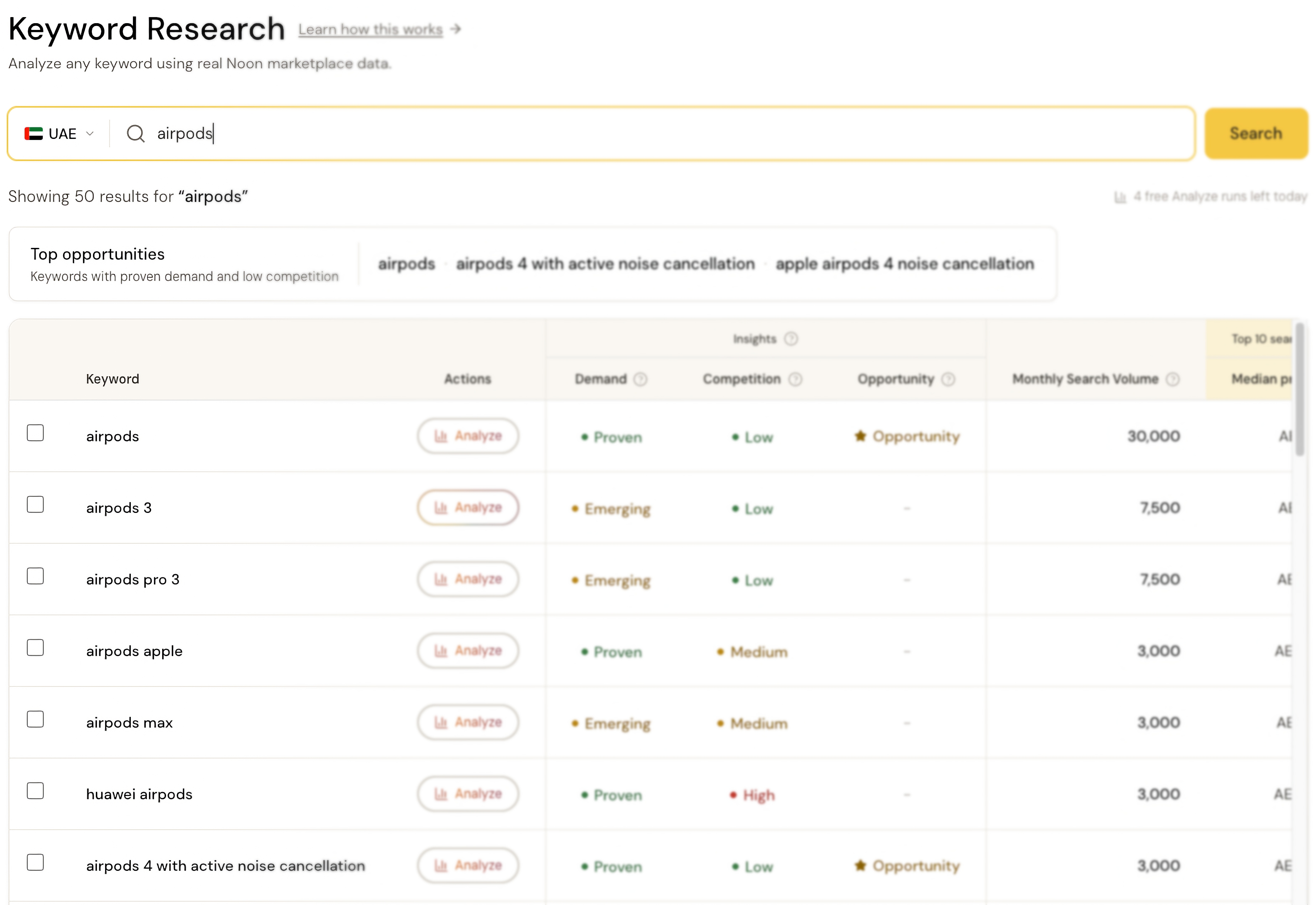
Dunescout makes this searchable in seconds. Type a keyword and get back related terms shoppers actually search for, across both the UAE and Saudi Arabia, along with real monthly search volume.
Each keyword also comes with a set of real numbers pulled from its actual top listings on Noon, price, ratings, reviews, ads, and more, so you can see exactly how strong the competition really is, not just how many people are searching.
Three plain labels sum all of that up at a glance:
- Demand: how proven shopper demand is for this keyword
- Competition: how crowded the top listings already are
- Opportunity: flagged automatically when a keyword has both proven demand and low competition, the combination that actually matters
A keyword with proven demand and low competition is usually worth building a product around. Low demand, or high competition, is often a sign to look elsewhere.
Going deeper with Analyze
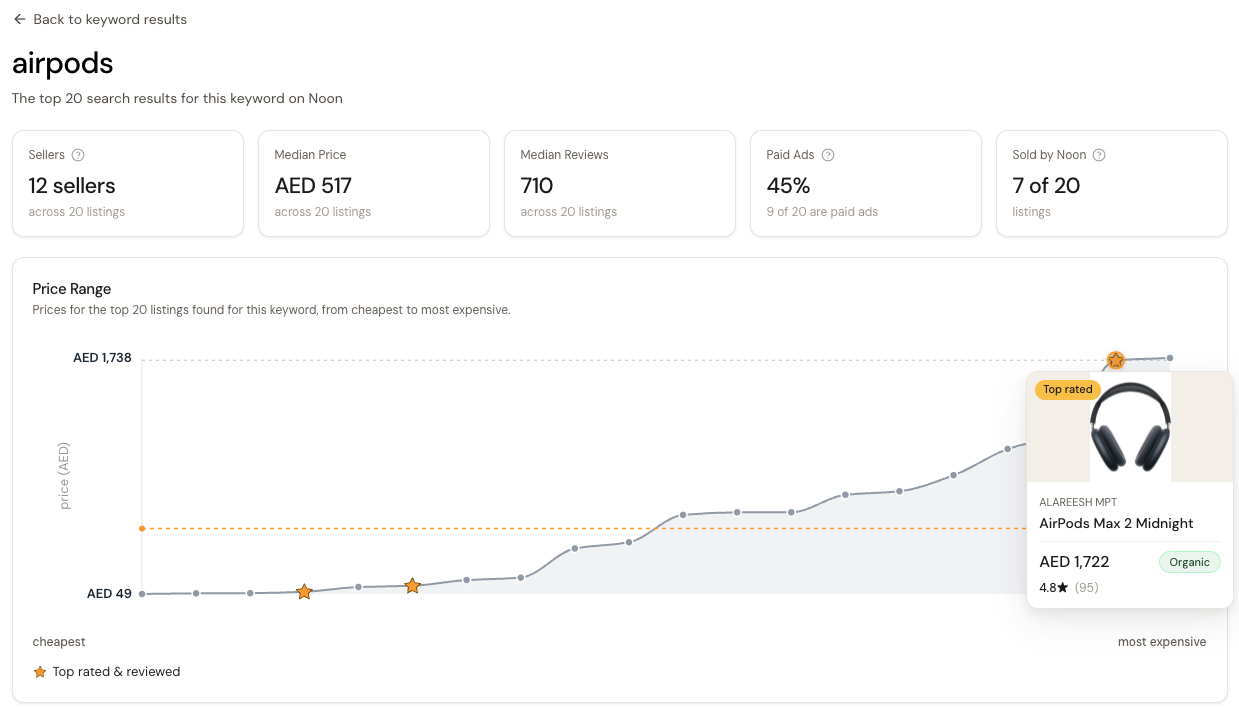
Found a keyword worth a closer look? Click into it to run an Analyze report. This gives you a live look at that keyword's actual top 20 listings on Noon, right when you click.
An Analyze report is a full, detailed picture of that keyword, far more than a quick search shows. A few examples of what it can tell you:
- Which sellers are winning this keyword, and whether one seller controls most of it
- How many listings are paid ads
- Whether Noon itself is selling directly against you
- What the best-reviewed listings actually look like
- When the same product is being sold by more than one seller under separate listings, something that's hard to spot on your own
And that's just part of what's in the report.
Frequently asked questions
Is there a keyword research tool for Noon.com?
Yes. Dunescout is built specifically for Noon, real search volume, competition data, and demand/opportunity signals in one search, covering both the UAE and Saudi Arabia.
How do I find good keywords to sell on Noon?
Look for keywords with proven demand and low competition at the same time. Dunescout flags these automatically as an Opportunity, so you don't have to compare every number yourself.
How do I check how competitive a keyword is on Noon?
Dunescout pulls real numbers from a keyword's actual top listings on Noon, price, ratings, reviews, ads, and more, and sums them up as a simple Competition label so you can tell at a glance how crowded it already is.
Can I use Amazon tools like Helium 10 or Jungle Scout for Noon?
Not reliably. Noon has its own shopper base and search patterns across the UAE, Saudi Arabia, and Egypt, so keyword data from Amazon tools often doesn't match how the same terms perform on Noon.
Does Noon show sellers search volume?
Not in any easy way. Whatever data exists inside Noon is hard to find and isn't built for comparing keywords side by side, so most sellers have no practical way to check demand before making a decision.
What does "Opportunity" mean when researching a keyword?
It means a keyword has both proven shopper demand and low competition at the same time, the combination most worth building a product around.
How do I see who else is selling for a keyword on Noon?
Click into any keyword to run an Analyze report. It shows you the actual top 20 listings on Noon right now, including which sellers are winning and how many are running paid ads.
Does Dunescout work in Saudi Arabia, or just the UAE?
Both. Keyword Research covers the UAE and Saudi Arabia, switchable from the same search.
Related